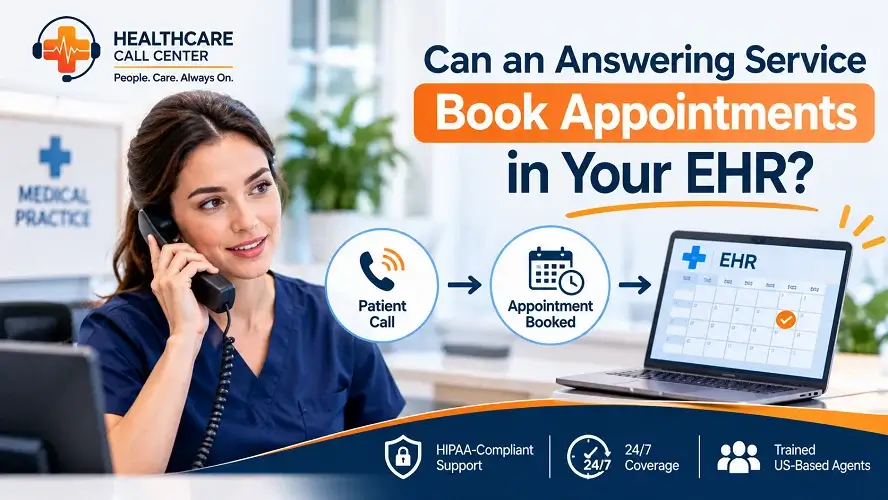
A scheduler calls in sick. The phone keeps ringing. And someone in the meeting asks the question every busy practice eventually asks: can we just have the answering service book appointments straight into the EHR?
It sounds like the obvious fix. The answer is more interesting than a yes or no, and knowing it before you sign a contract will save you from both overpriced software promises and underpowered message-taking services that call themselves booking support.
Quick answer: Most medical answering services do not write appointments directly into your EHR chart system, and that is largely by design: chart access is the highest-security data you hold. What a well-run service does instead is capture complete booking requests on live calls, verify the details against your rules, and deliver them to your schedulers or scheduling workflow in minutes, often with after-hours coverage your EHR portal cannot provide. Some setups also book into linked scheduling tools or patient portals. Ask any provider exactly where bookings land before you sign.
This guide walks through what practices usually mean by booking in the EHR, what answering services can and cannot do, how the appointment workflow actually runs, the security questions to ask, and when booking requests beat direct access.
What Practices Mean When They Say “Book in the EHR”
The phrase covers three different workflows, and mixing them up is where most practices start disappointed.
Interpretation one: the service writes appointments directly into your EHR schedule, the way your front desk does. Interpretation two: the service books into a patient-facing scheduling tool, a portal, or a booking widget connected to your calendar, the way a patient booking online does. Interpretation three: the service captures complete, structured appointment requests on live calls and routes them to your scheduling team for confirmation.
Each is a real workflow. They differ in speed, security surface, and who controls the final confirmation. Sorting out which one you are actually buying is the first question to ask any provider.
Can an Answering Service Book Directly in Your EHR?
Usually, no. And the reasons are mostly good ones.
Your EHR holds the chart: clinical notes, medication lists, test results, insurance records. Giving an external answering team write access to scheduling inside that system means granting access to an environment built for clinical staff, expanding your security review, and creating audit obligations for every entry an outside party makes. Well-run services treat chart access as out of scope on purpose.
There is also a workflow reason. Front-desk schedulers do more than drop a name in a slot. They check referral requirements, confirm insurance details, match visit types to providers, protect complicated slots, and catch the patient who called for one thing and needs another. An answering service that pushed bookings straight into the schedule would bypass exactly that judgment layer, and double-bookings, wrong visit types, and missed prep instructions follow.
What strong services offer instead is a structured booking workflow that feeds your scheduling team, covered in the next section, plus occasional integrations with patient-facing scheduling tools where the service can complete a booking in a connected calendar on the caller’s behalf. Both approaches keep the chart itself closed while still getting the appointment captured in minutes rather than the next morning.
How Appointment Booking Actually Works With an Answering Service
The workflow that works in real practices has four steps.
- Step one: capture. The agent answers live, works from your approved script, and collects exactly what your schedulers need: caller and patient details, visit reason, provider preference, location, urgency, and best callback times. Because a person is on the call, the awkward cases get handled too: the patient who describes symptoms, the parent calling for a child, the new patient who is not sure which visit type they need.
- Step two: verify. The agent confirms details back to the caller and applies your rules: which requests are routine, which need a specific provider, which need escalation instead of booking.
- Step three: route. The complete request lands where your scheduling team actually works: a shared queue, a secure message, an email with a structured summary, or a booking in a connected scheduling tool when your setup supports it. After-hours requests are waiting the moment your desk opens instead of scattered across voicemail.
- Step four: confirm. Your schedulers confirm the slot with the patient, or the service confirms within the rules you approve. Either way the patient hears from you quickly, which is the part patients judge you on. Our appointment scheduling support shows what that capture-to-confirmation flow looks like in practice.
The Security Questions: BAAs, Access, and Patient Details
Any answering service handling patient calls should answer four questions clearly, and you should ask them before signing anything.
Do you sign a BAA? Coverage that touches patient details should run under a signed business associate agreement. The BAA requirements guide covers what that agreement should cover.
Where do booking details go? The answer should be a defined, access-controlled destination: your scheduling queue, your secure inbox, or a connected scheduling tool. If a provider answers “in agents’ notes,” keep shopping.
Who can see patient details? You want least-privilege access: only the agents working your account, with documentation practices that match your workflows.
How fast do booking requests reach your team? Minutes during covered hours is the standard a good service hits, because speed of follow-up is a large share of the value. The patient lead management support covers what happens to new-patient requests in that window and why it matters to revenue.
When Booking Requests Beat Direct EHR Access
The request-and-route model is not a consolation prize. It has three real advantages over outside parties writing to your schedule.
Your schedulers keep control of the calendar. Complex rules stay enforced: referrals, visit types, provider-specific slots, procedure prep, follow-up spacing. Nothing lands in a slot that your team has not confirmed.
The security surface stays small. No external write access to the chart environment means a smaller compliance review, fewer audit obligations, and no risk of an outside entry corrupting schedule data.
Every request arrives complete. Because a live agent captured the details on a call, your schedulers work from structured summaries instead of voicemails that trail off or texts with half a sentence. The outsourced patient scheduling benefits guide compares these workflows in detail, and the appointment scheduling specialist explains why the capture step decides the quality of everything downstream.
Direct self-serve scheduling has its place too. Patients who know exactly which visit they need, and your portal supports it: let them book. The answering service exists for everyone else, which is usually the majority of callers who pick up the phone in the first place.
What to Ask an Answering Service Before You Sign
Bring this list to the demo. A confident provider answers all of it in plain language.
On live calls: exactly what does the agent capture for a booking request? Can we see the script? On routing: where do requests land, in what format, and how fast?
On after hours: who takes booking requests at 9 PM on a Saturday, and where do they go? On security: do you sign a BAA, who accesses patient details, and how are message records stored? On reporting: what do we see about booking-request volume, outcomes, and response times? And on scope: what happens when a caller needs something the service cannot do, like clinical advice, and how does escalation work?
If you want a second opinion on any proposal, send it over with your call volume and we will review it against your actual coverage gaps on a 15-minute discovery call.
What Booking Calls Sound Like in Real Practices
The capture step is where quality lives, so it helps to hear what the difference sounds like.
A new patient calls at 4:50 PM asking about a first visit. On a voicemail line, they leave a name and number, and your desk calls back the next morning to a game of phone tag. On a live line, the agent captures the referral source, the concern, the preferred location, and the days that work, so the callback comes once, informed, and lands as a booked visit. That first exchange is also where appointment setters earn their title, and our appointment setter services breaks down that role in detail.
An existing patient calls to move a procedure follow-up. The agent confirms which provider, which location, and whether prep instructions apply, then routes the request with all three answers attached. Your scheduler confirms the new slot in one call instead of three.
A caller after hours asks whether a symptom can wait until morning. The agent does not guess. The call follows your escalation rule exactly as written, which is the part of the workflow your attorney, your liability carrier, and your on-call provider all care about most.
Three calls, three clean outcomes, zero voicemail. That is the standard the capture-and-route workflow is built to hit.
Frequently Asked Questions About Answering Services and EHR Appointment Booking
Can an answering service book appointments directly in my EHR?
Most services do not write directly into EHR schedules, because chart systems hold clinical data and external write access expands security and audit obligations. Strong services capture complete booking requests on live calls and route them to your schedulers in minutes, and some can book into connected patient-facing scheduling tools where your setup supports it.
Will my schedulers still control the calendar?
Yes. In the request-and-route workflow, your scheduling team confirms every appointment, which keeps referrals, visit types, and provider rules enforced and eliminates double-booking risk from outside entries.
How fast do booking requests reach my scheduling team?
With a well-run service, structured requests reach your scheduling queue or inbox within minutes of the call, including after-hours calls, so your desk starts the morning with complete requests instead of voicemail.
Is it HIPAA compliant for an answering service to handle booking details?
It can be, when the service signs a BAA, restricts access to the agents on your account, uses defined secure destinations for patient details, and avoids collecting clinical information that has no scheduling purpose. Ask each provider to describe these controls specifically.
Can the answering service use my online booking system?
Often yes. If your practice runs a patient-facing scheduling tool, the service can complete bookings there on the caller’s behalf within your rules, which combines live capture with confirmed slots for straightforward visit types.
What happens to booking requests that come in after hours?
They are captured live by the answering agents, documented in your format, and delivered to your scheduling workflow, so requests wait in a queue rather than in voicemail. Urgent calls follow your approved escalation rules instead of a booking template.
Appointments are where missed calls become missed revenue. Book a free 15-minute discovery call and we will map your scheduling workflow, show you where booking requests leak, and tell you exactly how live coverage would hand appointments to your schedulers.
15-Minute Discovery Call. No Sales Pressure. Clear recommendations for your scheduling flow.